
EIVA

100%

Redesigning VIKING's e-learning LMS
CLIENT
VIKING Life
SERVICES
UX Intern
The challenge: modernise the tool without removing what worked
VIKING Safety Academy used a proprietary Course Creator to build certified digital training. Experienced authors valued its familiarity and VIKING's control over the platform, but its ageing structure made work repetitive and difficult to learn.
Interviews surfaced an outdated editor, unclear controls, weak page and course overviews, no undo/redo, limited templates, confusing labels, and too many manual steps.
How might we make course creation faster and easier to learn while preserving the simplicity experienced authors already valued?

Training-author feedback was grouped into existing strengths, recurring complaints, and priorities so the redesign could preserve familiarity while addressing daily friction.

Using the double diamond design thinking method through-out.
1. Find where the time was going
Watching training authors work exposed a deeper problem than dated visuals. Courses usually arrived as completed PowerPoint or PDF files. E-learning developers then rebuilt the same material manually inside the Course Creator.
A course could contain more than ten lessons, with up to fifty pages in a lesson. Authors placed elements page by page without templates, layout guides, breadcrumbs, or a useful page overview. Reuse depended on a slow clipboard workaround.

Observation revealed that course content was effectively created twice: once in the source document and again inside the platform.
This changed the project from "refresh the interface" to reduce duplicated authoring work.
I mapped the journey from catalog selection through lessons and editor work, connecting moments of frustration to opportunities for templates, bulk actions, visible structure, and fewer trips between separate screens.

The journey map made time cost and emotional drop-offs visible across catalogs, lessons, and editing.
Make structure, controls, and system state visible
Two first-time users completed think-aloud tasks in the existing platform. Both encountered problems that had not been prominent in stakeholder conversations: buttons were difficult to notice, labels were puzzling, save behaviour was unclear, and parts of the editor did not communicate what could be changed.

First-time users exposed discoverability and feedback problems experienced authors had learned to work around.
Those sessions pushed the design toward familiar interaction patterns rather than novelty. I sketched the catalog, lesson structure, and editor as one connected system before moving into a high-fidelity prototype.

Low-fidelity concepts helped test structure and feature scope before visual detail was added.
Stronger catalog search, sorting, labels, and in-place actions
Lessons and pages combined into one collapsible overview
Master Pages for reusable layouts
Bulk duplication, copying, dragging, and assignment
A visible page overview and integrated media bank
Clearer labels, preview behaviour, status, and recovery

Catalog actions became visible and contextual instead of sending authors through separate pages.
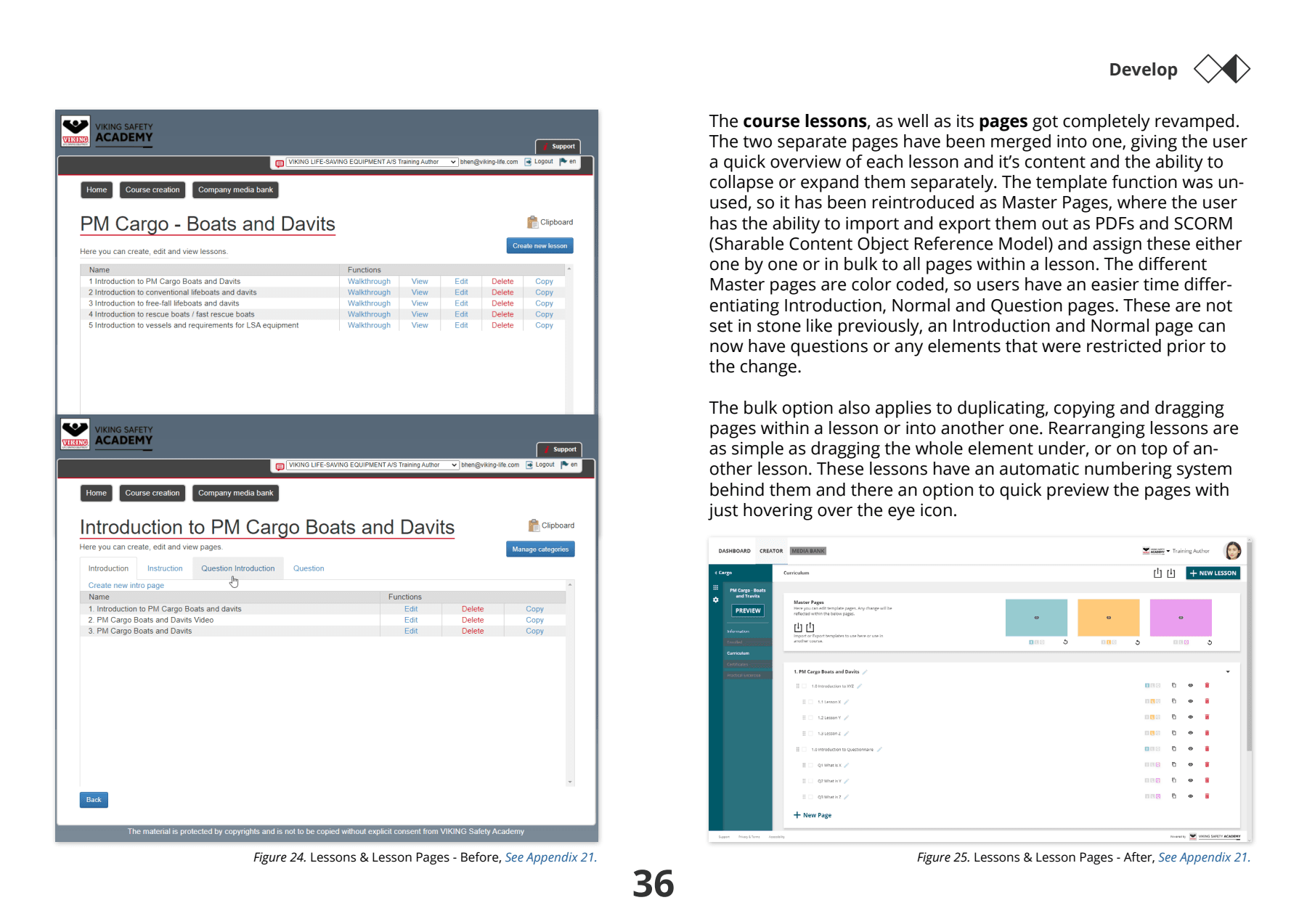
Combining lessons and pages created a faster overview and made bulk editing possible.

The editor gained a page overview, integrated media access, familiar controls, and clearer preview behaviour.
3. Let feedback challenge the first solution
Where design choices were uncertain, I ran rapid comparative sessions with groups of three to eight colleagues. These comparisons informed the home page, navigation, catalog presentation, curriculum labels, and account menu.
Where design choices were uncertain, I ran rapid comparative sessions with groups of three to eight colleagues. These comparisons informed the home page, navigation, catalog presentation, curriculum labels, and account menu.

The informal comparisons were useful for direction, but were not treated as statistically conclusive.
I then walked four stakeholders and experienced users through the prototype. Their feedback changed several important details:
Catalog delete became safer publish/unpublish controls.
Activity and course status became visible to avoid overlapping work.
Automatic lesson numbering was made configurable.
Long lessons received a stronger page-overview direction.
Right-click actions needed clearer signposting.
Preview moved closer to lesson pages.
Shortcuts extended beyond the editor.

An experienced user's feedback led to safer catalog controls, clearer activity status, and improved preview behaviour.
This protected expert control. The redesign became clearer for new users without forcing experienced authors into one rigid way of structuring a course.
4. Balance familiarity with meaningful change
The final direction borrowed conventions from tools authors already used, including PowerPoint and visual editors. Familiarity reduced the learning burden; the value came from removing repetition and making structure visible.
Clearer hierarchy and navigation
Consistent interaction patterns
Reusable page structures
Faster movement between catalogs, lessons, pages, and media
Better error, status, and permission feedback
A foundation for future LMS integration and offline workflows
The project produced a high-fidelity interactive MVP direction rather than a released product. It was documented for stakeholder review and handoff, with further usability testing and technical feasibility work identified as the next steps.
Outcome and learning
The work gave VIKING Safety Academy a concrete direction for modernising the Course Creator while preserving the parts its authors already understood.
A prioritised view of author needs and recurring friction
A journey connecting pain points to product opportunities
A redesigned catalog, lesson structure, editor, and preview
Reusable templates and bulk-action concepts
Iterations informed by first-time and experienced users
A handoff-ready prototype for continued development
The strongest changes came from watching where authors lost time, seeing what first-time users could not understand, and allowing experienced users to challenge assumptions in the prototype.
Portfolio note: This case is based on a 2020 bachelor thesis collaboration. It presents a reviewed design direction, not post-launch performance metrics. Personal participant details have been omitted.