BENCE HENZ
BENCE HENZ
BENCE HENZ

Redesigning a course creator for maritime safety training

Redesigning a course creator for maritime safety training

A UX/UI redesign of VIKING Safety Academy’s internal course creator, focused on making it faster and easier for training teams to build, edit and manage e-learning courses for maritime safety.

A UX/UI redesign of VIKING Safety Academy’s internal course creator, focused on making it faster and easier for training teams to build, edit and manage e-learning courses for maritime safety.

A UX/UI redesign of VIKING Safety Academy’s internal course creator, focused on making it faster and easier for training teams to build, edit and manage e-learning courses for maritime safety.

Client

VIKING Life-Saving Equipment A/S

Role

UX Designer

Year

2020-2021

Collage of Samsung product advertisements featuring Galaxy Z Fold7, Galaxy Z Flip5, Galaxy AI camera features, and a Minecraft Movie promotion.

The Brief

The Brief

The course creator was used to produce e-learning material for maritime safety training. It worked, but users had to spend too much time on manual setup, repeated actions and navigating a dated interface.

The goal was to improve the course creation workflow without removing the simplicity that users already valued.

The redesign needed to support course creators, internal stakeholders and training teams while staying realistic for future development.

The course creator was used to produce e-learning material for maritime safety training. It worked, but users had to spend too much time on manual setup, repeated actions and navigating a dated interface.

The goal was to improve the course creation workflow without removing the simplicity that users already valued.

The redesign needed to support course creators, internal stakeholders and training teams while staying realistic for future development.

The problem:

The existing system made course creation slower than it needed to be.


Users struggled with:

  • Manual page copying and repetitive setup.

  • Limited support for templates and bulk editing.

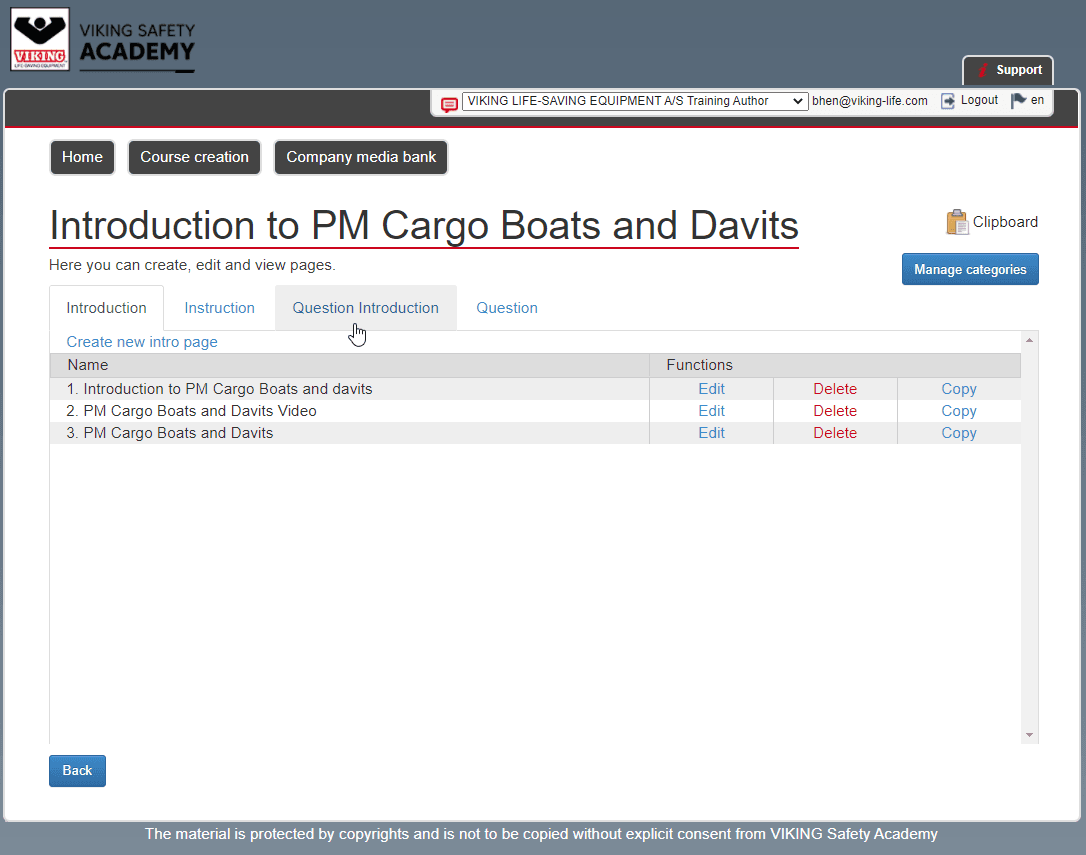
  • A visually dated interface.

  • Unclear navigation between courses, lessons and pages.

  • Weak media handling.

  • Missing modern usability patterns such as drag-and-drop.

  • Inconsistent structure and unclear guidance.

The core problem was not that the system lacked value. It was that the workflow made users work too hard to create and manage training content.

Hand holding Samsung Galaxy S25 Series smartphone with promotional message about an exclusive voucher and AI companion.

Approach

Approach

I led the UX process from research to final prototype.

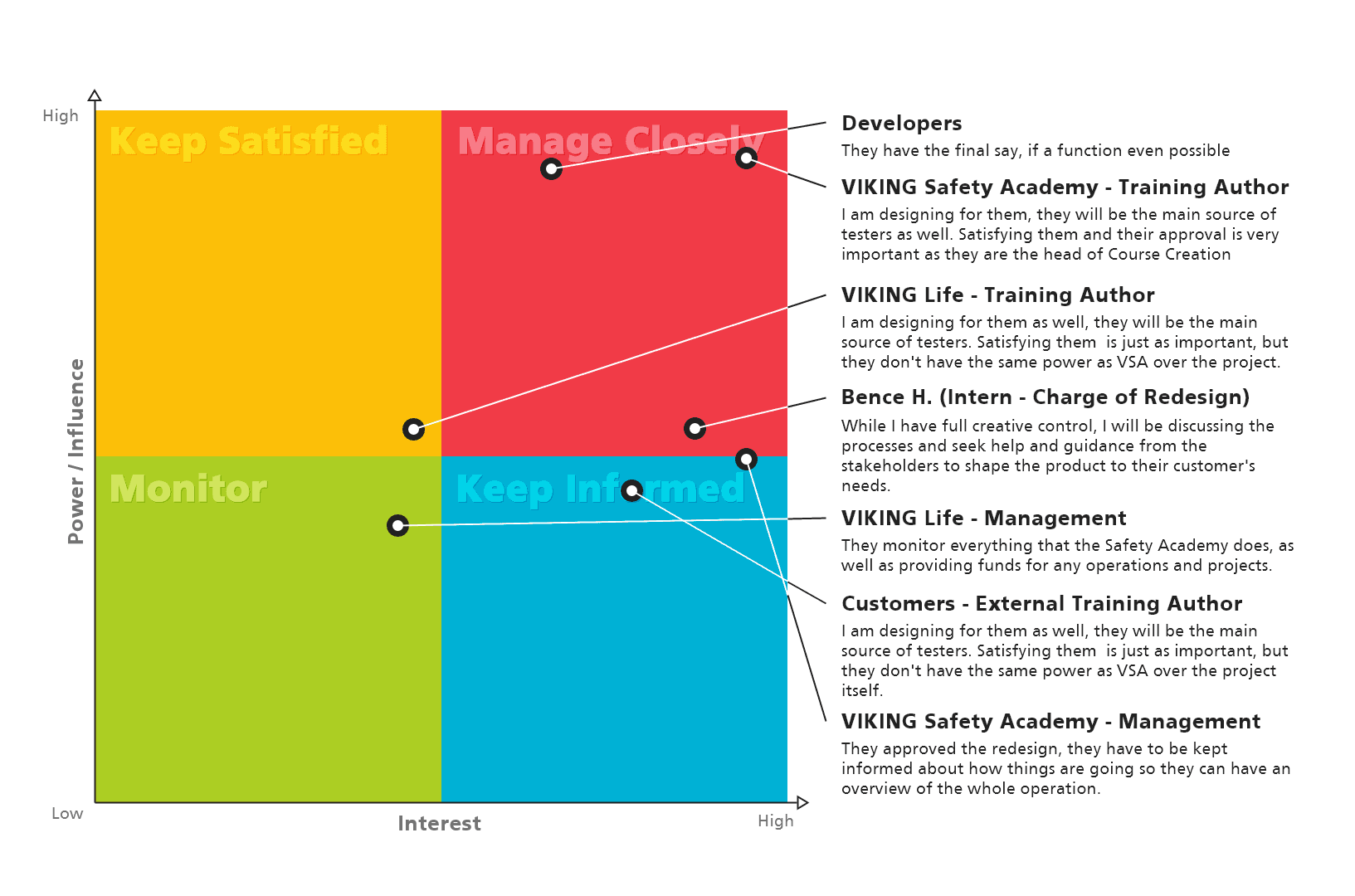
The work started with understanding how internal users created, edited and published courses. I spoke with stakeholders and users, reviewed the existing workflow, mapped pain points and compared the platform with other learning tools such as Udemy, Coursera and LinkedIn Learning.

The redesign was shaped through wireframes, prototypes and usability testing. Because of COVID-19 limitations, testing was carried out with internal users, using think-aloud tasks and heuristic evaluation to identify issues with labels, navigation, button visibility and workflow clarity.

The goal was not to redesign everything for the sake of it. The goal was to remove unnecessary effort from the course creation process.

I led the UX process from research to final prototype.

The work started with understanding how internal users created, edited and published courses. I spoke with stakeholders and users, reviewed the existing workflow, mapped pain points and compared the platform with other learning tools such as Udemy, Coursera and LinkedIn Learning.

The redesign was shaped through wireframes, prototypes and usability testing. Because of COVID-19 limitations, testing was carried out with internal users, using think-aloud tasks and heuristic evaluation to identify issues with labels, navigation, button visibility and workflow clarity.

The goal was not to redesign everything for the sake of it. The goal was to remove unnecessary effort from the course creation process.

Hand holding Samsung Galaxy S25 Series smartphone with promotional message about an exclusive voucher and AI companion.

User personas

User personas

Text explaining Samsung

KEY INSIGHTS

KEY INSIGHTS

Right arrow
Right arrow

Course creation was too manual

Users had to repeat simple actions too often, especially when copying pages, reusing content or managing larger courses.

Right arrow
Right arrow

The structure was hard to follow

The relationship between courses, lessons and pages was not always clear, making it harder to understand where content belonged.

Right arrow
Right arrow

Media handling slowed users down

Adding and managing images, video and other assets required too much manual work.

Right arrow
Right arrow

The interface felt dated

The visual design made the system feel heavier than it needed to be, and important actions were not always easy to see.

Right arrow
Right arrow

Users wanted speed, not more complexity

The strongest need was not a more advanced tool. It was a clearer, faster workflow that still felt familiar.

Text explaining Samsung

Recommendations

Right arrow
Right arrow

Simplify the course dashboard so users can see progress, structure and next actions more clearly.

Right arrow
Right arrow

Introduce templates and bulk editing to reduce repetitive work.

Right arrow
Right arrow

Improve the relationship between courses, lessons and pages.

Right arrow
Right arrow

Redesign the media bank with search, tagging and drag-and-drop placement.

Right arrow
Right arrow

Rename unclear areas, such as changing “Walkthrough” to “Preview.”

Right arrow
Right arrow

Improve button visibility, labels and feedback so users understand what is happening.

Right arrow
Right arrow

Keep the interface simple enough for existing users to adopt without major retraining.

Design solution

Design solution

The final prototype focused on a clearer and faster course creation experience.

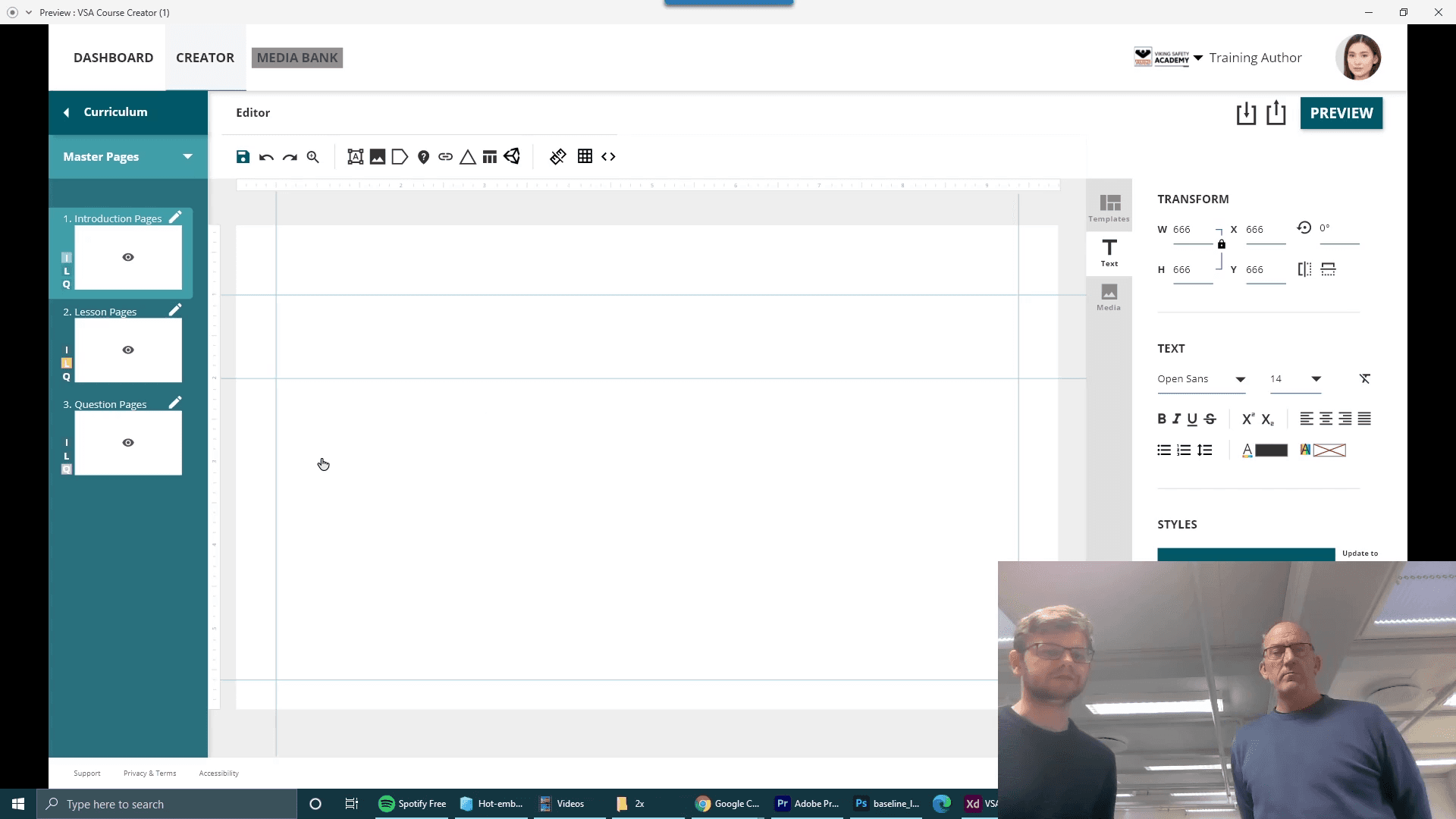
The dashboard was redesigned to give users a better overview of courses, progress and editing tasks. Lessons and lesson pages were combined into a clearer structure, making it easier to manage the course hierarchy.

The course editor was simplified, with drag-and-drop media handling, clearer labels and fewer repeated actions. A redesigned media bank helped users find, organize and place assets faster.

The final prototype focused on a clearer and faster course creation experience.

The dashboard was redesigned to give users a better overview of courses, progress and editing tasks. Lessons and lesson pages were combined into a clearer structure, making it easier to manage the course hierarchy.

The course editor was simplified, with drag-and-drop media handling, clearer labels and fewer repeated actions. A redesigned media bank helped users find, organize and place assets faster.

MAPPING:

Text explaining Samsung

LEGACY UI:

Text explaining Samsung

WIREFRAMES:

Text explaining Samsung

SOME SNIPPETS OF THE NEW UI:

Text explaining Samsung

Outcome

The redesigned course creator made the workflow clearer and easier to use. The final concept gave VIKING a complete system mock-up for future development and a stronger structure for improving the learning.


This project taught me how much UX matters inside learning and safety-training systems. Small workflow issues can create real friction when people need to produce accurate training material at scale.


The strongest lesson was that redesigning a tool is not about making it look new. It is about understanding what users already value, removing unnecessary effort and making the next step easier to see.

30%

Reduction in time spent on course creation

40%

Increase in user satisfaction

25%

Faster onboarding for new user

Next Project

Up arrow
Up arrow

Get in touch

© Copyright 2026

Get in touch

© Copyright 2026

Get in touch

© Copyright 2026

Create a free website with Framer, the website builder loved by startups, designers and agencies.